
How to Find Your Real Origin IP Behind Cloudflare, Safely (and How to Fix Leaks)

If your mail setup (MX) points to the same server that hosts your website (common with cPanel, Plesk, DirectAdmin), then your “hidden” origin can leak through DNS in a way that’s completely normal and expected. This article shows how to audit it safely, using public DNS data, and what to change if you don’t want that exposure.
Important: Do this only for domains you own or manage, or where you have explicit permission. Use it as a security audit, not as a way to target someone else.
Why Cloudflare can’t hide your MX IP
MX records tell the world where to deliver email. Cloudflare can’t proxy SMTP mail like it proxies HTTP/HTTPS for websites, so the mail server needs a real IP address that is reachable directly.
So the key point is this, your MX IP is not automatically your website origin IP, but it often becomes the origin IP when people host mail and web on the same box.
What you’re going to do in this audit
You’ll answer four practical questions:
1. What hostnames are used for MX
2. What IP address those MX hostnames resolve to (confirmed across resolvers)
3. Who owns that IP, and what kind of network it is (hosting, ISP, suspicious, etc.)
4. Whether that IP is blacklisted anywhere (useful for email deliverability, also a risk signal)
Step 1: Find the MX hostnames
Use your DNS records tool first: https://networkwhois.com/dns-records
Look up:
• Domain: example.com
• Record type: MX
You should see one or more MX targets, for example:
• mx1.provider.tld
• example-com.mail.protection.outlook.com (Microsoft 365)
• aspmx.l.google.com (Google Workspace)
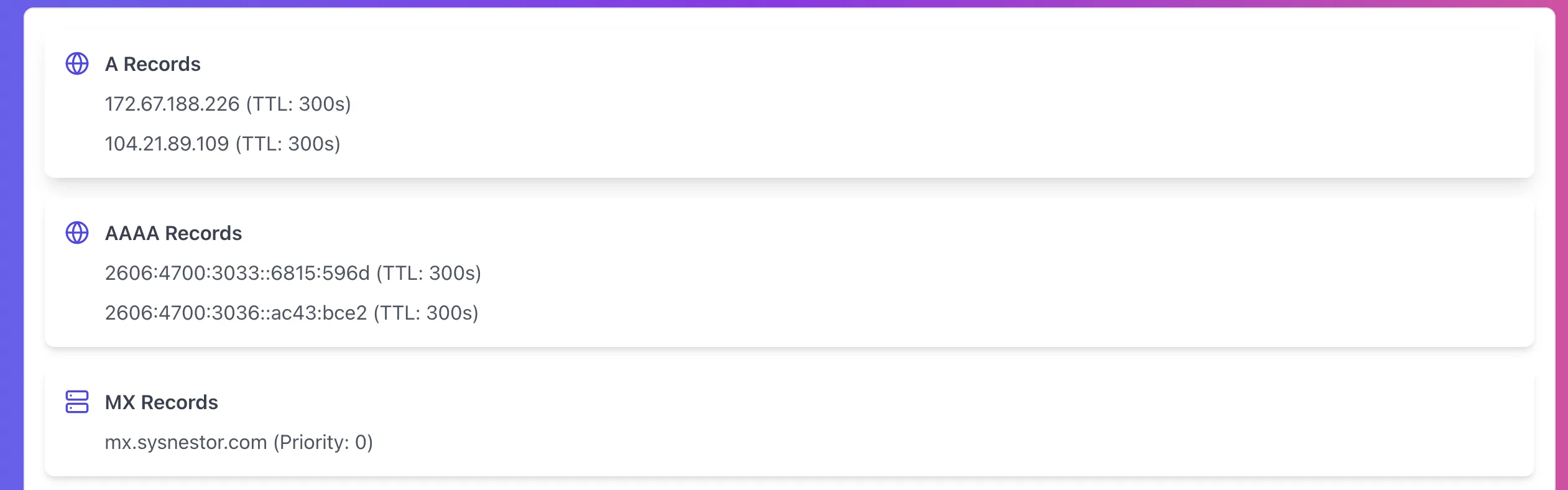
What to note down: the exact MX hostname(s). You’ll resolve those next.
Step 2: Resolve the MX hostname to an IP (and confirm it’s consistent)
Now go to DNS propagation: https://networkwhois.com/dns-propagation
Do this for each MX target hostname:
• Enter: the MX hostname (example mail.example.com)
• Select record type: A (and also check AAAA if you run IPv6)
• Run the check
You want to see if major resolvers agree on the same IP.
Example output style (your tool shows it as DNS server results):
DNS Server Results
Google (8.8.8.8)   Propagated   192.168.0.1   TTL 3600
Cloudflare (1.1.1.1) Propagated  192.168.0.1   TTL 3600
Quad9 (9.9.9.9)    Propagated   192.168.0.1   TTL 3600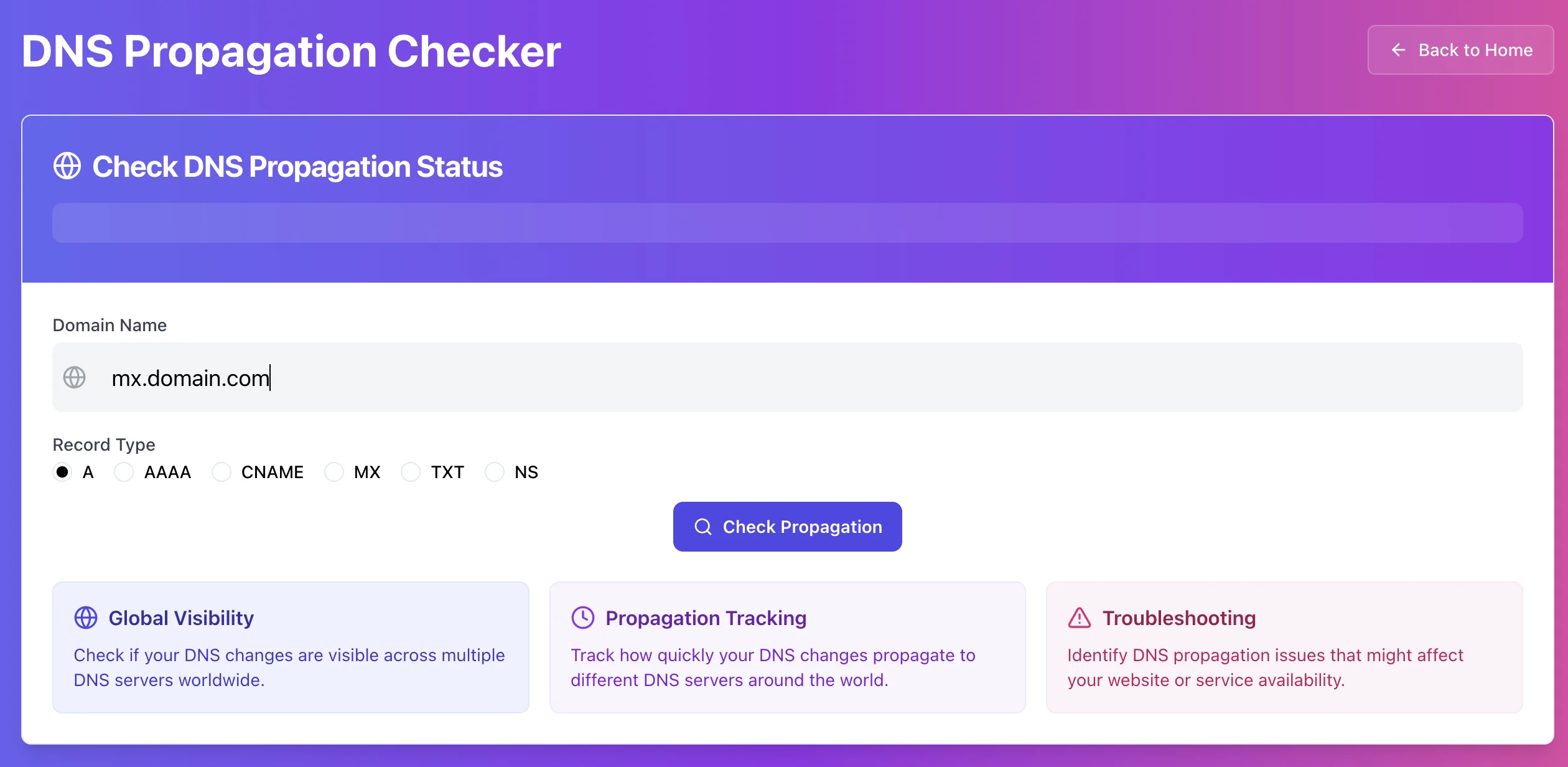
What this tells you: The mail server hostname resolves to 192.168.0.1 everywhere, so that’s the public mail IP.
Now, the critical part, decide whether this IP is also your website origin.
Quick check to confirm “same server” patterns
If your web server and mail server are the same box, you usually see one of these:
• mail.example.com resolves to the same IP as the origin
• cpanel.example.com and webmail.example.com also resolve to the same IP
• Your root domain has DNS-only records that point to that same IP (or you forgot to proxy one hostname)
You don’t need to guess. Compare the IPs you get from:
• website origin hostnames you control (like origin.example.com, cpanel, webmail, mail)
• any “grey cloud” records that are DNS-only
Step 3: Run WHOIS to understand what that IP actually is
Now take the IP you found (example 192.168.0.1) and run: https://networkwhois.com/whois
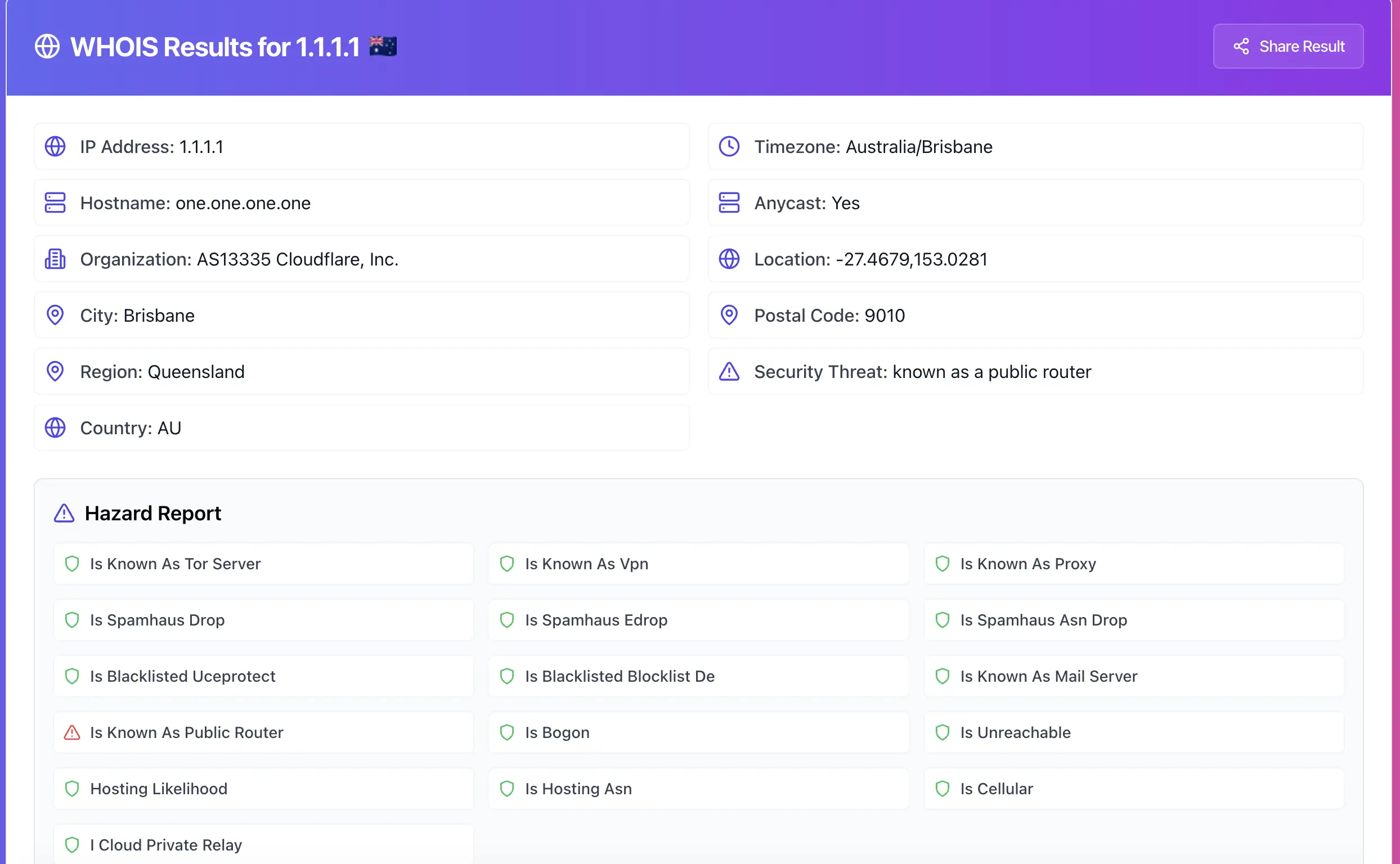
This is where you learn what you’re dealing with:
• Is it a hosting provider ASN (typical for VPS and dedicated servers)
• Is it a residential or mobile ASN (common for dynamic IPs, usually wrong for production mail)
• Is it a known proxy or Tor-type IP (high risk for reputation)
• Any blacklist-related hazard flags that suggest reputation problems
Your WHOIS output “Hazard Report” style can include indicators like:
• Tor, VPN, Proxy signals
• Spamhaus or ASN drop signals
• UCEPROTECT flags
• “Known as Mail Server”, “Hosting likelihood”, “Bogon”, “Unreachable”, etc.
Those signals are not court evidence, but they’re useful context. If the IP looks like “hosting mail server” on a clean ASN, fine. If it looks like “high-risk proxy, listed everywhere”, you’ve got a reputation issue and possibly a compromised system.
Step 4: Check if the IP is blacklisted (email deliverability and risk)
Now run: https://networkwhois.com/ip-blacklist-checker
Paste the same IP.
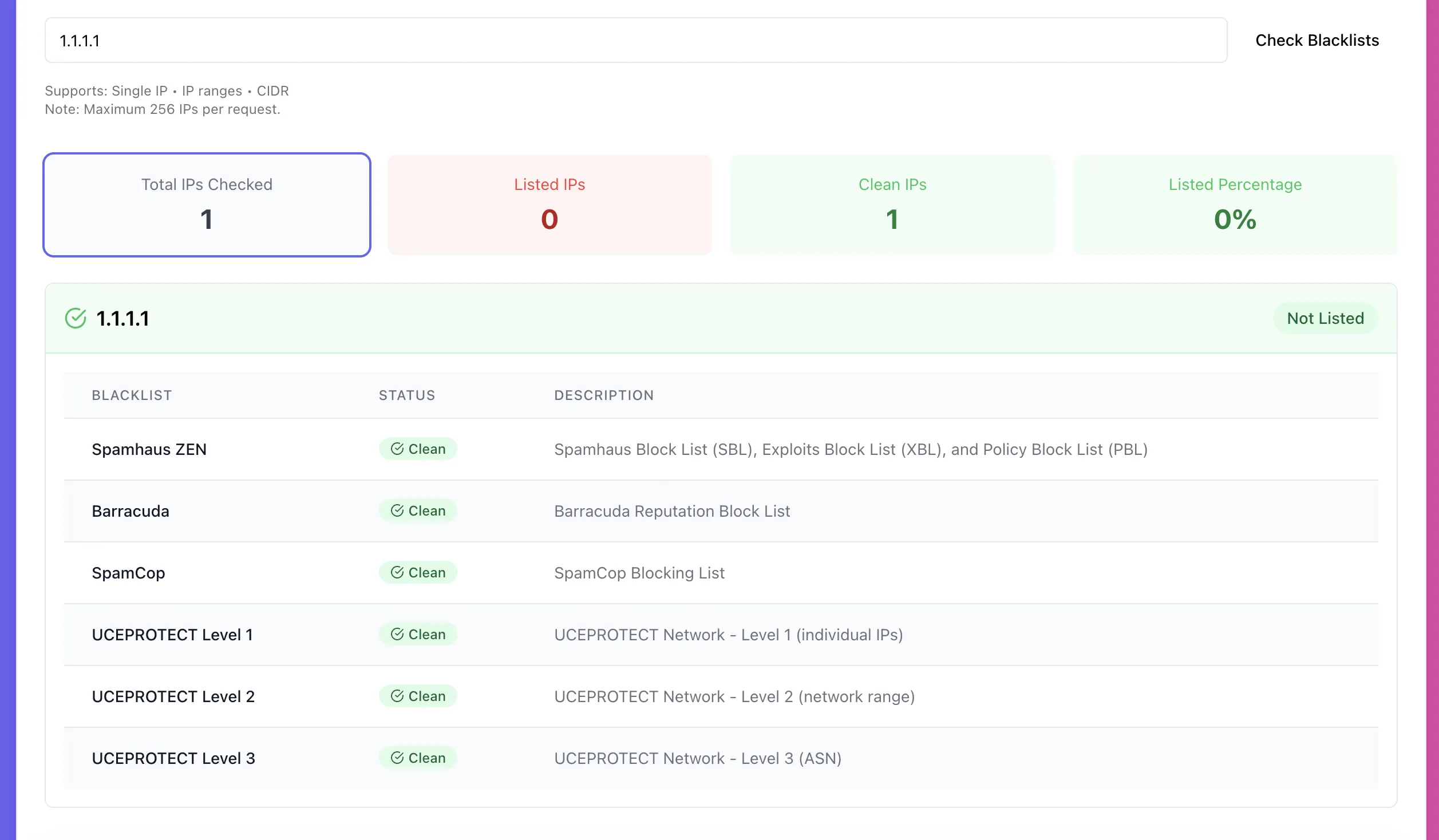
This step matters for two reasons:
• If that IP is your mail server IP, blacklisting can directly explain spam folder issues and bounces.
• If that IP is also your website origin, blacklisting can also be a signal that the server has been abused, compromised, or previously used for spam.
What to do if you confirmed the MX IP equals your web origin IP
If your mail server and website share the same IP, and you want the origin to stay private, you have only a few realistic options.
Option 1: Separate mail from web (best, simplest)
Move mail to:
• a dedicated mail provider (Google Workspace, Microsoft 365, Mailgun, etc.)
• a separate mail VPS with its own IP
Result: MX reveals only the mail IP, your web origin stays hidden behind Cloudflare.
Option 2: Keep mail on the same server, but accept the origin exposure
This is the common cPanel reality. If you do nothing, your origin IP is knowable to anyone who checks MX. That’s not automatically “danger”, but you should harden accordingly.
Hardening checklist:
• Firewall the origin so only Cloudflare IP ranges can reach ports 80/443
• Lock down admin panels (/wp-admin, /cpanel, /plesk) with IP allowlists, MFA, rate limits
• Make sure no DNS-only hostnames point to origin unnecessarily (direct, origin, server, old subdomains)
• Disable unused services, patch aggressively
Option 3: Use a mail gateway or relay
If you must keep local mailboxes but want cleaner reputation and separation, use an outbound relay. Inbound still needs MX pointing somewhere reachable, so this is partial.
The mistakes that leak origin even when you “use Cloudflare”
These are the usual leaks I see:
• mail.example.com points to origin, and the site shares the same server
• cpanel.example.com, webmail.example.com, direct.example.com are DNS-only and expose the origin
• You proxied www but forgot the root domain @
• Old subdomains still resolve to the server IP and nobody cleaned them up
• You publish service records that reveal origin hostnames unintentionally
Fixing these is mostly DNS hygiene plus network hardening.
Try it now
Audit your domain in 5 minutes:
Get MX hostnames with DNS Records: https://networkwhois.com/dns-records
Resolve MX hostnames with DNS Propagation (A): https://networkwhois.com/dns-propagation
Identify ownership and risk with WHOIS: https://networkwhois.com/whois
Check reputation with IP Blacklist Checker: https://networkwhois.com/ip-blacklist-checker
Admin User
Author